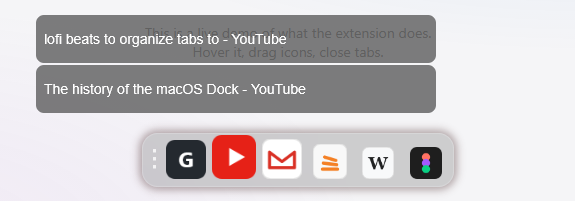
Tab Dock is a free, open-source browser extension that groups open tabs by site in a macOS-style dock at the bottom of the window. Unlike OneTab, it keeps every tab open and running, so you can pick up where you left off.
Features
- Each site gets one icon that groups all its open tabs.
- Hover over an icon to see its tabs, then click the one you want to open.
- Drag icons to rearrange them. The dock remembers the order, and you can move it to the top of the window.
- Each window has its own dock and keeps its native Chrome tab groups.
Who it’s for
Anyone who works with dozens of tabs, including Google Workspace users, researchers and developers switching between localhost, staging and production.
Privacy
Tab Dock sends no data and uses no analytics, servers or accounts. It saves only the icon order and dock position on your device and stays off in private browsing windows.
Installation
Get Tab Dock from the Chrome Web Store for Chrome, Edge or Brave, or from Firefox Add-ons. The source code is licensed under GPL v3.